CCFEW Logo

Citizens Concerned About the Future of the Etobicoke Waterfront

Updated: Mar. 7, 2010

What’s New:

March Bird Walk Report & Photos

Rotary Park Community Design Workshop

Latest Developments on 51 Lake Shore

CCFEW Comments on Stormwater Management EA


This site uses Java scripts and Flash. Some elements won’t be displayed properly if these are not enabled on your browser.

Many of the links on these pages require Adobe (Acrobat) Reader. If you don’t already have it, click the link below:

Get Reader
Get Java
Get Flash
Checklist Printing

[Home] [Activities] [Bird Walks] [Checklist Printing]

In 2004, TD Canada Trust Friends of the Environment Foundation financed the printing of a bird checklist as well as funding all 10 walks. At the time of printing, it included all of the species seen on our walks in recent years. There are some blank spaces at the end of the list, and they get used regularly, as we often find something that’s not on the list. Copies of the checklist are available free of charge at any of our walks, but if you would like to print you own copies, it is available as a pdf on this page.

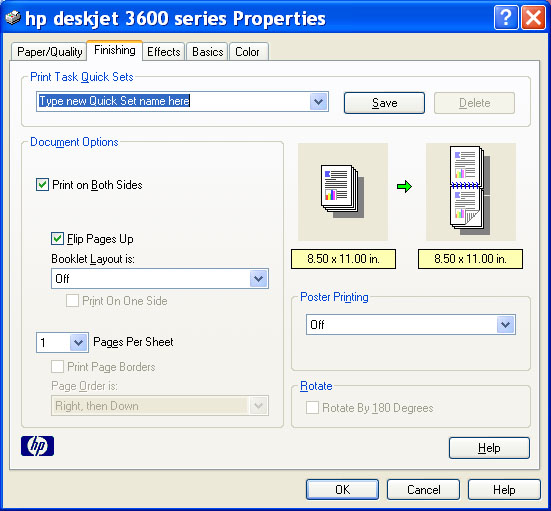
Some care is required to print the list successfully. All printers are different, so I have tried to make these instructions as generic as possible. If your printer supports duplex printing, select the option called something like, “flip on the short side” The printer dialogue should look something like this:

Printer Dialogue

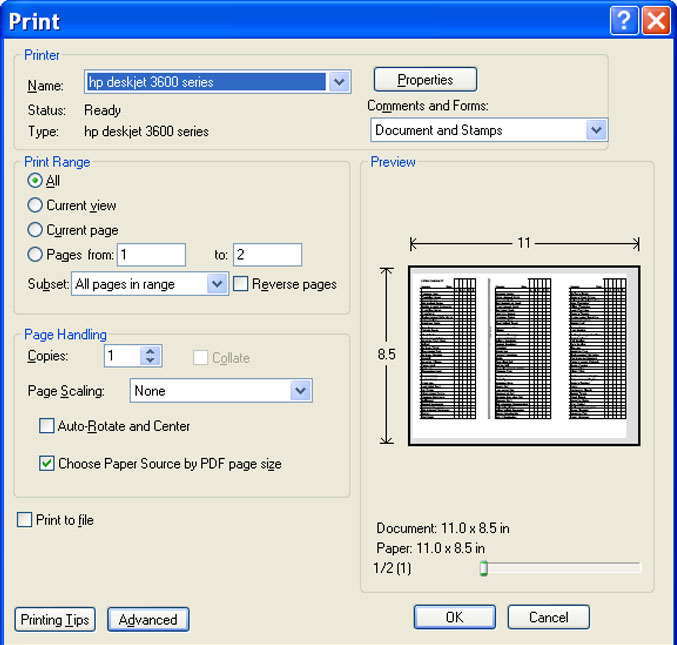
In the Adobe Reader print setup, choose Paper Scaling: None, and make sure the box is checked beside “Choose Paper Source by PDF page size”. The dialogue box should look something like this:

Reader Dialogue

For manual duplexing, the edge that came out of the printer last, will be the first edge to go back in. The side up on the second pass will depend on the printer. The side to print should be indicated on your printer. Generally, for printers that take paper from the bottom and output on the top, the side up from printing the first page should be the side up going in for the second page. For printers that take paper from the top back and output from the bottom front, you will want side one facing down, when you print side two.

When you are finished printing, you should be able to fold the right edge of page one over to the gray line, and then fold the left edge over to the first folded edge. Hopefully, you are now looking at a perfectly printed and folded checklist!

If not, or if all this sounds like too much trouble, come out to the next walk and get a free preprinted copy!

[Home] [Bird Walks] [Checklist Printing] [March 2010 Bird Walk] [January 2010 Bird Walk] [November 2009 Bird Walk]

Google
WWWwww.ccfew.org

Home     Contact

Web Hosting by 1&1 1and1